
You’ve spent hours building the perfect Sim, designing their dream home, and carefully crafting their storyline—but something still feels missing. Maybe the Maxis-made content is starting to feel repetitive, or you’ve seen screenshots online that make your game look like it belongs to a different generation entirely. If that sounds familiar, you’ve probably stumbled across mentions of “Deesims” and wondered what all the hype is about. The short answer is that Deesims is a custom content creator—specifically known for creating some of the most high-quality, detailed hair and clothing for The Sims 4—and using their content can completely transform how your Sims look and feel. In this guide, I’ll walk you through exactly what Deesims offers, how to safely install their custom content, and why so many Simmers consider their creations essential for a truly personalized gameplay experience.
First, let’s clarify what Deesims actually is. Deesims is a custom content (CC) creator who specializes in creating realistic, high-definition hairstyles and clothing for The Sims 4. Unlike the cartoony, sometimes plastic-looking textures of the base game, Deesims’ creations lean toward a more natural, textured aesthetic. Their hairstyles are particularly famous—they feature fine, realistic strands, natural-looking roots, and textures that range from sleek straight hair to voluminous curls, coils, and everything in between. Their clothing items are similarly detailed, often featuring realistic fabric textures, proper draping, and contemporary styles that feel current and stylish. For players who feel that the base game’s CAS (Create-a-Sim) options are limited, Deesims offers an alternative that makes Sims look more like real people and less like stylized characters.
So why has Deesims become such a big name in the Sims 4 custom content community? The answer lies in the combination of quality, consistency, and accessibility. Deesims releases content regularly, and each item is meticulously crafted. The hairstyles often come in a wide range of colors—sometimes 30 or more swatches—including natural shades, fantasy colors, and even ombre or highlighted options. The meshes (the 3D structure of the hair or clothing) are optimized to avoid clipping issues, which is a common problem with lesser-quality CC. Additionally, Deesims typically keeps their content free to download, operating on a “early access” model where new items are available for Patreon supporters first and then released to the public after a few weeks. This means that anyone can access their full library without paying, though supporting them on Patreon gets you immediate access to new releases.
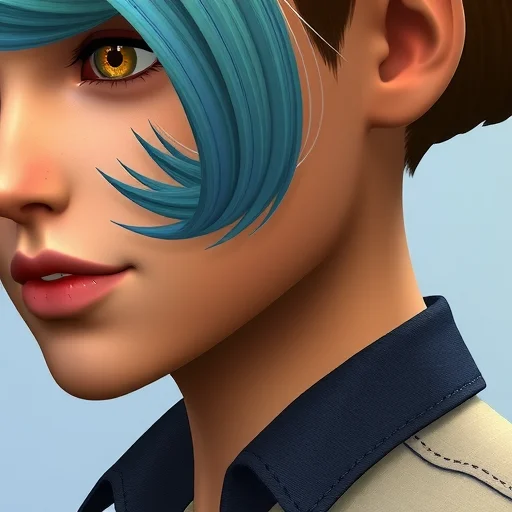
Now, let’s talk about how to actually use Deesims content in your game. The process is straightforward but requires a few steps. First, you’ll need to know where to find Deesims’ creations. Their main hub is their Patreon page (patreon.com/deesims), where all their content is organized. You don’t need to be a patron to browse or download public releases—just navigate to their posts and look for the ones marked as “public” or “free.” Some of their older content is also available on The Sims Resource (TSR), a popular CC hosting site. Once you’ve found an item you want—say, a hairstyle or a dress—download the package file. These files usually end with “.package.” After downloading, you’ll need to place the file in your Sims 4 Mods folder. On most computers, this folder is located in Documents > Electronic Arts > The Sims 4 > Mods. If you don’t have a Mods folder, you can create one. Make sure that in your game settings, you have “Enable Custom Content and Mods” checked, as well as “Script Mods Allowed” if you’re using any script-based mods alongside Deesims’ CC. After placing the files in the Mods folder, restart your game. The next time you open Create-a-Sim, the new hairstyles and clothing will appear alongside your base game items, usually under the “Custom Content” filter.
One important thing to note about Deesims content is that it is “alpha” CC, as opposed to “Maxis match.” In the Sims 4 CC community, there are two main aesthetic styles. Maxis match CC tries to replicate the game’s original art style—slightly cartoonish, with simplified textures and stylized hair. Alpha CC, which is what Deesims creates, aims for realism. Alpha hair looks more like real hair with visible strands and natural movement, and alpha clothing often has more detailed textures. Neither is “better” than the other—it’s purely a matter of personal preference. However, if you mix alpha CC with Maxis match content, the difference in style can be noticeable. Some players love the hyper-realistic look of full alpha CC; others prefer the cohesive feel of Maxis match. If you’re new to CC, it’s worth downloading a few Deesims items to see if the alpha aesthetic appeals to you.
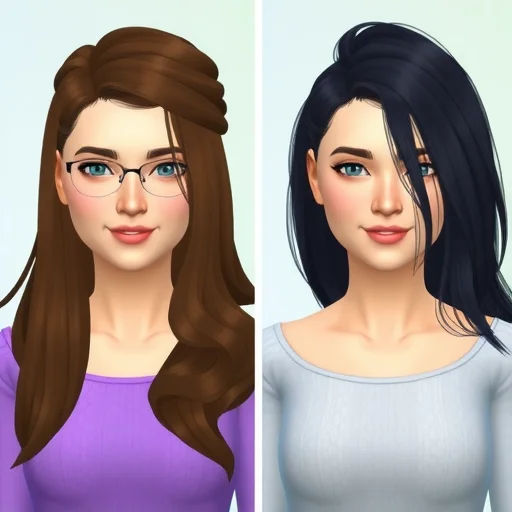
Let’s get into some practical tips for using Deesims content effectively. First, because Deesims hair is often high-poly—meaning it has a high number of 3D polygons for that realistic detail—it can be more demanding on your computer’s graphics card than base game content. If you have an older or lower-end computer, using too many high-poly CC items at once may cause lag or longer loading times. A good rule of thumb is to be selective: choose a few favorite Deesims hairstyles for your main Sims rather than filling your entire CAS with high-poly items. Second, Deesims clothing often comes with a variety of swatches, but some items may require the “shoes” accessory to be removed if you want to use their own shoes—this is common with full outfits. Always check in CAS if the outfit is categorized as a “full body” outfit or separates like top and bottom. Third, keep your CC organized. Create subfolders inside your Mods folder (like “Deesims Hair” and “Deesims Clothing”) so you can easily find and remove items if you need to troubleshoot or if you decide you no longer want a particular piece.
Now, let’s talk about the experience of integrating Deesims into your gameplay. I’ve been using Deesims content for several years, and I can tell you firsthand that it changes how you engage with your Sims. When your Sims have realistic, beautifully textured hair and stylish, well-fitted clothing, they feel more like characters in a story rather than game avatars. I’ve found that I spend more time in CAS, experimenting with different combinations of Deesims hair and outfits, and I feel more invested in my Sims’ appearances. For storytelling-focused players, this level of customization is invaluable. Whether you’re creating a Sim for a legacy challenge, building a world filled with unique characters, or simply enjoying the creative process of design, Deesims provides tools that make your vision possible.
One common question players have is whether Deesims content is safe and regularly updated. The Sims 4 gets frequent patches and updates, and sometimes these updates can break custom content. Deesims is an active creator who regularly checks their content for compatibility and updates it when necessary. If you follow their Patreon or social media accounts, you’ll get notifications about updates. For general safety, always download CC from trusted sources—Deesims’ own Patreon, their official The Sims Resource page, or verified links from their social media. Avoid third-party repost sites, as they sometimes bundle files with unwanted extras.
Another aspect worth mentioning is that Deesims is part of a larger community of CC creators who collaborate and support each other. You’ll often find that Deesims hairstyles are styled specifically to work with accessories from other creators, and many Sims 4 players build their CC collections around a few key creators whose styles complement each other. If you like the Deesims aesthetic, you might also enjoy creators like Anto, Wingssims, or S-Club for additional hair and clothing options that have a similar realistic feel.
If you’ve been feeling like your Sims are all starting to look the same, or if you’ve seen those stunningly realistic Sims on social media and wondered how they achieved that look, Deesims is likely part of the answer. Their custom content elevates your game from standard to stunning with just a few downloads. The process of installing and using CC might seem intimidating at first, but once you’ve done it a couple of times, it becomes second nature. And the payoff—seeing your Sims with beautiful, unique hair and outfits that reflect their personalities—is absolutely worth the minimal effort. Deesims is a custom content creator known for high-quality, realistic alpha hairstyles and clothing for The Sims 4. Their detailed textures, wide color ranges, and consistent updates make their CC a favorite among players seeking a more lifelike aesthetic. Download from their Patreon or The Sims Resource, install to your Mods folder, and enable custom content in game settings to transform your Sims’ appearance.
I was nervous about using alpha CC because I thought it would look out of place, but Deesims items blend so well together. I use alpha hair and clothes but keep Maxis match skin details and it actually works. My game feels like a whole new experience.
Just a heads-up for anyone downloading Deesims: the hair is gorgeous but definitely on the higher poly side. I have a mid-range gaming laptop and I can only use a few high-poly hairs per Sim before I notice lag. Still worth it for my main Sims though.
Deesims hair is the only hair I use anymore. The texture, the movement, the color options—everything is just leagues above base game. My Sims actually look like real people now and I spend twice as long in CAS because I can’t stop styling them.
The early access model is really fair. I’m not a patron but I still get everything eventually. I just bookmark their Patreon and check back every few weeks for the public releases. Plenty of free content to keep my game fresh without spending anything.
I love that Deesims does such a wide range of hair textures. Finding good curly and coily hair in the base game is impossible, but Deesims has multiple options that actually look realistic. Representation matters, even in Sims games.