
You’ve probably heard the term “SIM card” countless times—when you bought your phone, when you traveled internationally, or when a carrier told you to “insert your SIM.” But if someone asked you to explain what a SIM card actually does, could you give a clear answer? The core truth is that a SIM card—short for Subscriber Identity Module—is the tiny chip that acts as your phone’s identity card. It’s what tells the mobile network who you are, what plan you’re on, and how to connect your calls, texts, and data. Without a SIM card, your phone is essentially a Wi-Fi-only device, unable to connect to a cellular network. In this guide, I’ll break down exactly what a SIM card does, the different types available today, and how to choose and manage the right one for your needs.
Let’s start with the basics: what’s actually on a SIM card? A SIM card is a small, removable chip that contains a unique identifier called the IMSI (International Mobile Subscriber Identity). This number is what your mobile carrier uses to recognize you on their network. The SIM also stores your phone number, your service plan details, and a small amount of storage for contacts and SMS messages (though most modern phones store this data on the device itself rather than on the SIM). When you turn on your phone, the SIM communicates with nearby cell towers, authenticates your identity with your carrier, and grants you access to their network. It’s essentially the key that unlocks your carrier’s services. Without it, the network doesn’t know who you are or how to route calls to your device.
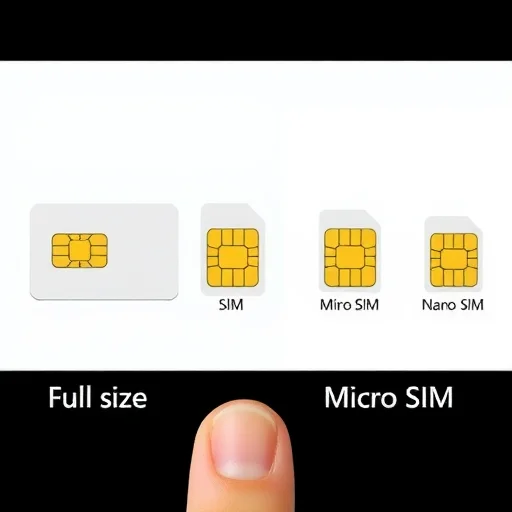
Now, let’s talk about the physical forms a SIM card can take. If you’ve had a phone in the last decade, you’ve probably seen how SIM cards have shrunk over time. The original SIM was about the size of a credit card—you rarely saw this one unless you were dealing with very old phones. Then came the mini-SIM, which was the standard for many years. After that, the micro-SIM became common, and today most phones use the nano-SIM, which is barely larger than the chip itself. Despite their different sizes, they all do exactly the same thing—they just fit into smaller spaces as phones got thinner. If you ever get a new SIM card, it usually comes as a triple-cut or multi-fit card: a larger plastic frame that you pop out the correct size from, so it works with any phone.
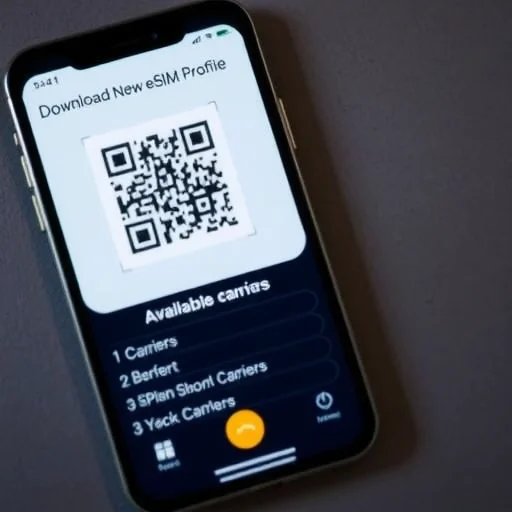
In recent years, a new type of SIM has emerged: the eSIM, or embedded SIM. Unlike a physical card, an eSIM is built directly into your phone’s motherboard during manufacturing. You can’t remove it, but you can program it wirelessly. With an eSIM, you don’t need to insert a physical card to connect to a carrier. Instead, you download a digital profile—often via a QR code or carrier app—and your phone connects to that carrier’s network. eSIMs are becoming increasingly common, especially in newer iPhones (from the XR onward), Google Pixels, and many flagship Android devices. Some phones, like the US versions of the iPhone 14 and 15, have even eliminated the physical SIM tray entirely, relying solely on eSIM. The advantages of eSIM are clear: you can store multiple carrier profiles on one device and switch between them without swapping physical cards, making it ideal for travelers or people who use separate work and personal numbers on the same phone.
So why does any of this matter to you? Understanding your SIM card—or whether you’re using an eSIM—affects several practical aspects of phone ownership. First, it determines your flexibility to switch carriers. With a physical SIM, switching carriers usually means obtaining a new SIM card from the new carrier and physically swapping it into your phone. With an eSIM, you can often switch carriers digitally in minutes, downloading a new profile without ever touching a physical card. Second, it affects how you manage international travel. Instead of paying expensive roaming fees, savvy travelers use local SIMs or travel eSIMs to get affordable data in their destination country. If your phone has a physical SIM slot, you can buy a local SIM upon arrival. If your phone supports eSIM, you can purchase a travel eSIM online before you leave and activate it instantly when you land. Third, it impacts how you handle a lost or stolen phone. If your SIM is stolen, someone could potentially use it to make calls or receive two-factor authentication texts. That’s why carriers recommend setting a SIM PIN—a small numeric code that locks the SIM card itself, requiring a PIN every time you restart your phone or remove the SIM.
Let’s get into the practical steps for managing your SIM card, starting with how to check what kind you have. On an iPhone, go to Settings > General > About, and scroll down to “Carrier Lock” or “Network Provider Lock.” If it says “No SIM restrictions,” your phone is unlocked and can accept SIM cards from any carrier. If it lists a specific carrier, your phone is locked to that carrier. On Android, the path varies but is typically in Settings > Connections > SIM Card Manager or About Phone > Status. For eSIM support, look for an “Add eSIM” or “Add Mobile Plan” option in your settings. If it’s there, your phone supports eSIM.
Now, let’s talk about when you might need a new SIM card. There are a few common scenarios. If you’re switching carriers and your current phone is compatible, you’ll need a new SIM from the new carrier—or if you’re using eSIM, you’ll download a new profile. If your SIM card is physically damaged—maybe it got wet or the contacts are scratched—you’ll need a replacement. If you’re traveling internationally, you’ll either use a local physical SIM, a travel eSIM, or your carrier’s roaming service. And if your phone is stolen, you should contact your carrier immediately to suspend the SIM to prevent unauthorized use. Most carriers can issue a replacement SIM with the same phone number, usually for a small fee.
One often-overlooked aspect of SIM cards is their security. SIM cards are not invulnerable. A technique called “SIM swapping” occurs when a malicious actor convinces your carrier to transfer your phone number to a SIM they control. This is particularly dangerous because many online accounts use SMS-based two-factor authentication—if someone controls your phone number, they can potentially reset passwords and access your accounts. To protect yourself, consider using app-based authenticators like Google Authenticator or Authy instead of SMS for two-factor authentication where possible. Also, set a SIM PIN on your physical SIM card; this prevents someone from using your SIM in another phone without the PIN.
Let’s walk through a real-world example to tie all this together. Maria, a consultant who travels frequently between the US and Europe, uses an iPhone with both a physical SIM slot and eSIM capability. For her home service in the US, she uses a physical SIM from her carrier. When she travels to Europe, she purchases a regional eSIM online before her trip. She downloads the eSIM profile, which becomes a secondary line on her phone. During her trip, she sets the eSIM as the primary data line, using local European data rates instead of paying US roaming fees. She can still receive calls and texts to her US number over Wi-Fi calling, and she can switch back to her US SIM for data the moment she returns. This flexibility—made possible by understanding both physical SIM and eSIM options—saves her hundreds of dollars per year in roaming charges.
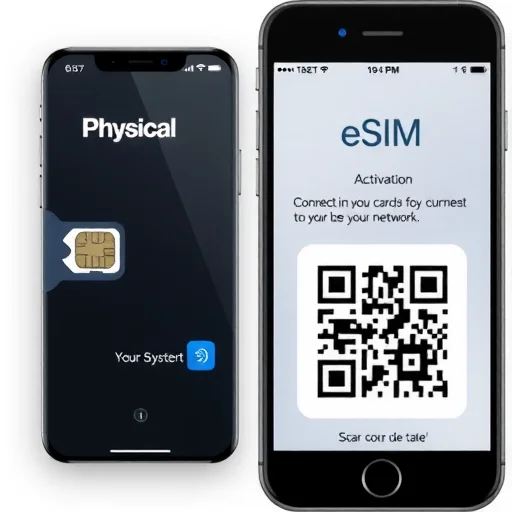
The future of SIM technology is clearly moving toward eSIM. Apple has already released iPhones in some markets with no physical SIM tray at all, and other manufacturers are following suit. eSIM offers advantages in design (more space for batteries or other components), convenience (no more fiddling with tiny SIM trays), and flexibility (multiple profiles, easy switching). However, physical SIM cards aren’t going away overnight. Many phones still use them, and they remain a simple, universally understood way to connect to a mobile network. Whether you’re using a nano-SIM or an eSIM, the core function remains the same: identifying you to the network and connecting you to the world.
If you’ve ever been confused about what that little chip in your phone actually does, you now have a complete picture. A SIM card is your phone’s identity on the mobile network—it tells carriers who you are, what plan you have, and how to route your calls and data. Whether physical or embedded, it’s the essential link between your device and the cellular world. Understanding how it works empowers you to switch carriers with confidence, travel without expensive roaming fees, and keep your account secure. So next time someone mentions a SIM card, you’ll know exactly what they’re talking about—and why it matters. A SIM card (Subscriber Identity Module) is a removable chip or embedded eSIM that identifies your phone to a mobile carrier, storing your phone number, plan details, and network authentication. Physical SIMs come in sizes from standard to nano; eSIMs are built-in and programmable wirelessly. Understanding SIM types helps with carrier switching, international travel, and account security.
I had no idea SIM swapping was a thing. Just went into my carrier app and set up a SIM PIN. It took two minutes and now I feel way more secure. Thanks for the heads-up.
The eSIM section was super helpful. I’m traveling to Japan next month and was dreading hunting for a SIM card at the airport. Now I know I can just buy an eSIM online before I go and activate it when I land. Game changer.
This explanation finally made it click for me. I always thought the SIM card just stored my contacts, but now I understand it’s basically my phone’s ID with the carrier. No wonder you need one to make calls.
I’m still confused about whether my phone supports eSIM. I have an iPhone 12 and I see an “Add eSIM” option in settings, so I guess it does? Might try it for my next trip instead of buying a physical SIM.
The size comparison photo is exactly what I needed. I just got a new phone and thought the SIM card was too small, but it turns out my old one was a micro and the new one needs a nano. Now I know to ask for a replacement from my carrier.